
Microsoft confirms it provided BitLocker recovery keys to FBI


If Microsoft can be compelled to produce your BitLocker recovery keys, what does “full-disk encryption” actually protect?
This week’s disclosures put a precise point on those questions. Microsoft confirmed it has, under a valid legal order, provided BitLocker recovery keys to the FBI to unlock three laptops in an early-2025 investigation, and further acknowledged that it receives similar requests each year, with outcomes largely hinging on whether users allowed keys to be backed up to Microsoft’s cloud.
The case is routine on paper, but explosive in practice, because it exposes how convenience defaults convert key custody into legal risk, and how that risk travels across borders with you.
The Event
According to Tom’s Hardware and The Verge, the FBI served Microsoft with a search warrant tied to an alleged COVID unemployment assistance fraud probe in Guam. Microsoft complied by providing BitLocker recovery keys associated with three laptops, enabling access to data that would otherwise remain unreadable.
Microsoft told reporters it does provide BitLocker recovery keys when presented with a valid legal order, adding that customers can choose to keep keys locally and out of Microsoft’s reach. Reporting further notes Microsoft receives roughly 20 such requests per year, many of which cannot be fulfilled because the keys were never uploaded to the cloud.
According to The Verge,
Microsoft said customers “can choose to store their encryption keys locally, in a location inaccessible to Microsoft, or in Microsoft’s cloud,” while cautioning that “key recovery offers convenience” but also risk.
Windows Central, summarizing Microsoft’s position and the Guam matter, emphasized that Windows 11’s common Microsoft Account setup flow typically stores BitLocker recovery keys in the user’s online account by default, which is what makes lawful access possible if a warrant arrives.
Computerworld framed the episode as a custody issue rather than a cryptographic failure, highlighting the enterprise governance implications of where keys live.
Operational Implications, Consumer and Enterprise
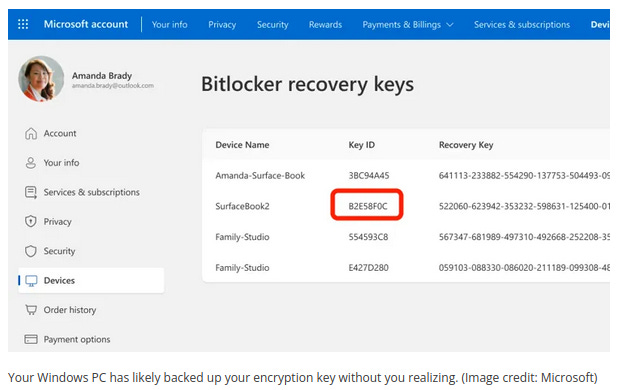
For consumers, default setup choices matter. If you signed into Windows with a Microsoft Account, your BitLocker recovery password may already be viewable in your account portal. Several outlets note that users can check whether keys are stored in the cloud and, if desired, delete them, with the understanding that doing so transfers recovery risk to the user.
Zac Bowden is a Senior Editor at Windows Central states that,
It's frankly shocking that the encryption keys that do get uploaded to Microsoft aren't encrypted on the cloud side, too. That would prevent Microsoft from seeing the keys, but it seems that, as things currently stand, those keys are available in an unencrypted state, and it is a privacy nightmare for customers.
For enterprises, this is a governance problem. Computerworld’s analysis underscores the need to define where keys are backed up, who can read them, and how “break-glass” is audited. Microsoft’s guidance documents describe storing recovery information in Entra ID or AD DS, using role-based access, just-in-time elevation, and immutable logging for key access, and, if policy demands, avoiding provider custody by keeping keys on-premises.
Treat recovery access like a privileged operation with ticketed approvals, rotation after use, and jurisdictional review when devices or personnel cross borders.
Conclusion
BitLocker did what it was designed to do, and so did the warrant. Microsoft’s admission clarifies the real control point, where recovery keys live, who can read them, which laws apply to the custodian, and which defaults your setup quietly accepted.
If you care who can open your data in an emergency, decide that now, in policy and configuration, not after an agent shows up with paper.